Verified maker
Notice: See time pass as you scroll.
Notice keeps a small timer in view while you use the iPhone apps you choose. Set a gentle reminder for when you'd like to take a break.
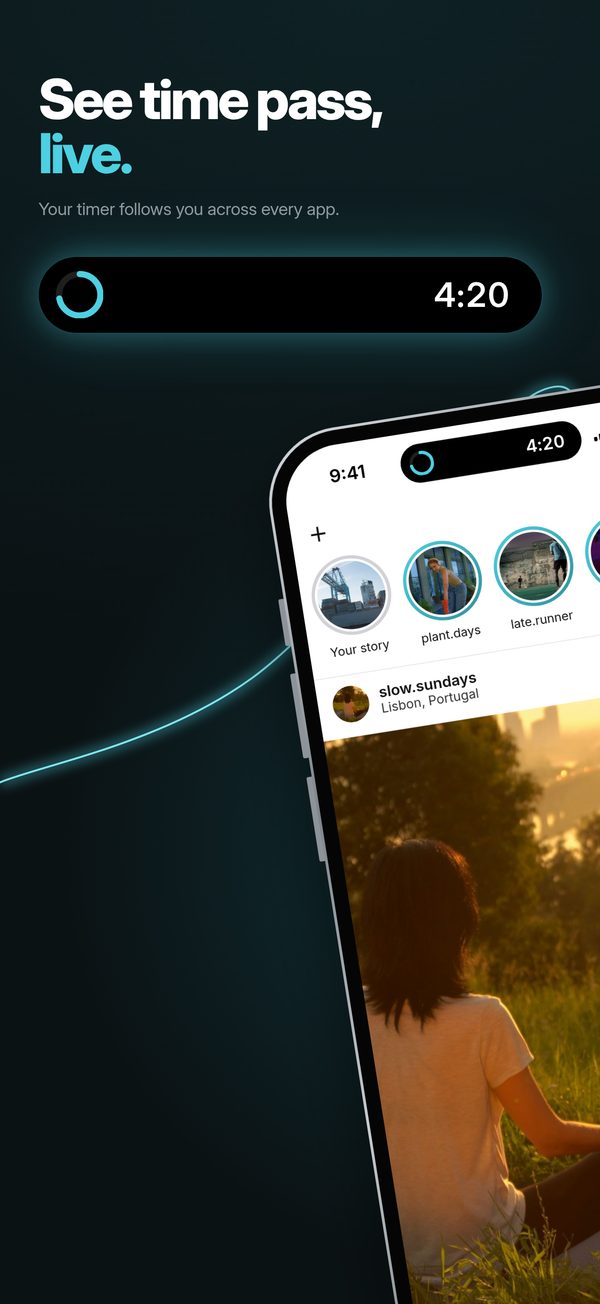
A little pause in your scroll
For the apps you open on autopilot and the sessions that go longer than you meant to.
Connect the apps you want to time using Apple Shortcuts. Notice starts counting as you open each one, with a timer in Dynamic Island or on the Lock Screen. You can add reminders and choose whether to keep going when they arrive. The maker recommends iOS 18.2 or later. The optional alarm needs iOS 26.1 and its own permission.
At a glance
- Platforms
- iPhone
- Price
- Free · no subscription or in-app purchases
Sources and updates
- Notice on iPhone
The product site has an interactive demo of the timer, reminders and color changes. The demo uses sample data.
- Set up Notice with Shortcuts
The guide walks you through choosing apps, adding the shortcut and enabling notifications and Live Activities.
- iPhone requirements
The setup guide recommends iOS 18.2 or later, while the App Store lists 18.0. The optional alarm needs iOS 26.1 and its own permission.
- Notice on the App Store
Version 1.2 appeared October 28, 2026. The download is free in the US and France.
- Privacy on the Notice website
The October 31 policy says connected-app names, 120 days of sessions and a Shortcuts log stay on the iPhone. It also explains Apple’s crash diagnostics and the website’s analytics.
- Privacy information linked in the App Store
The current product-site policy says connected-app names are stored on the iPhone. The policy linked by Apple says those names aren't stored on iPhone.
- Price and reminders
Notice is free with no in-app purchases or subscription. Reminders leave you free to keep using your apps.
- Released
- Page reviewed